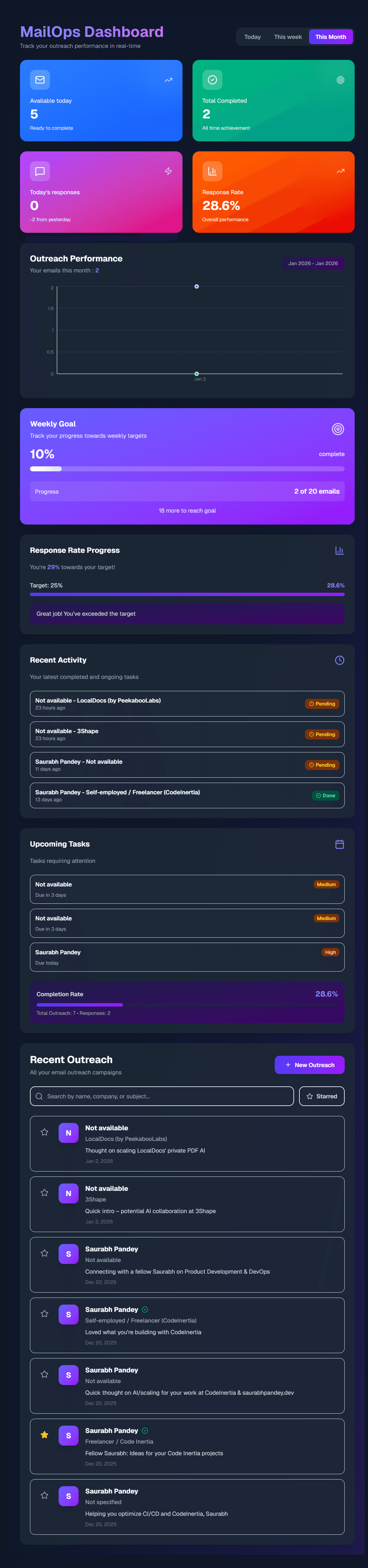
A production-ready email outreach platform powered by Gemini AI, built with Next.js, TypeScript, Tailwind CSS, and Firebase. MailOps revolutionizes cold email outreach by automating the research and personalization process, making it easier for sales teams and marketers to create effective, context-aware email campaigns.
The Problem
Cold email outreach is time-consuming and often ineffective. Sales professionals spend hours researching prospects, crafting personalized emails, and tracking responses. Traditional email tools lack intelligent automation that can extract context from LinkedIn profiles or company websites and generate truly personalized emails at scale.
The Solution
MailOps combines the power of Google's Gemini AI with a modern web stack to create an intelligent email outreach platform. The platform automatically extracts context from URLs (LinkedIn profiles, company websites) and generates personalized emails using pre-built templates, dramatically reducing the time spent on research and email composition.
Key Features
🔐 Firebase Authentication
Secure email/password authentication ensures that all user data and outreach campaigns are protected. The platform uses Firebase's robust authentication system to manage user sessions securely.
📧 Cold Email Templates
MailOps includes 5 pre-built email templates designed for different outreach scenarios:
- Value Proposition Outreach - Focus on value and outcomes
- Problem-Solution Framework - Identify and solve problems
- Social Proof Outreach - Leverage case studies and examples
- Direct Value Offer - Offer free resources or tools
- Personalized Research Outreach - Show research and insights
Each template supports dynamic placeholders:
{{name}}- Person's name{{company}}- Company name{{role}}- Job title/role{{recentActivity}}- Recent activity or signal
🤖 AI-Powered Generation
The core innovation of MailOps is its integration with Google Gemini AI's URL Context tool. When you provide a LinkedIn profile URL or company website, the AI:
- Extracts Context: Automatically scrapes and analyzes the content from the provided URLs
- Identifies Key Information: Pulls out relevant details like company size, recent news, job titles, and industry
- Generates Personalized Emails: Creates contextually relevant emails that reference specific information about the prospect
- Maintains Tone: Ensures the generated emails match the selected template's tone and structure
📊 Analytics Dashboard
Track your email performance with comprehensive analytics:
- Response Rates: Monitor how many prospects respond to your emails
- Template Performance: Compare which templates generate the best results
- Daily Trends: Visualize your outreach activity over time
- Regeneration Metrics: Track how often you regenerate emails and which versions perform better
The analytics dashboard uses Recharts to create beautiful, interactive visualizations that help you make data-driven decisions about your outreach strategy.
🔄 Regenerate & Edit
Not satisfied with the generated email? MailOps allows you to:
- Regenerate: Create new variations of the email with different approaches
- Edit: Manually fine-tune the AI-generated content
- Switch Templates: Try a different template while keeping the extracted context
- Version History: Track all versions of an email to compare performance
📝 Outreach Tracking
Manage your entire outreach pipeline:
- Response Tracking: Mark when prospects respond and add response text
- Follow-up Management: Track follow-up emails and their timing
- Notes: Add custom notes about each prospect
- Status Management: Organize prospects by status (pending, responded, followed up)
Technology Stack
Frontend
- Next.js 16 (App Router) - Modern React framework with server-side rendering
- TypeScript - Type-safe development for better code quality
- Tailwind CSS - Utility-first CSS for rapid UI development
Backend & Services
- Firebase Authentication - Secure user authentication
- Cloud Firestore - NoSQL database for storing outreach data
- Google Gemini AI - AI-powered email generation and URL context extraction
Data Visualization
- Recharts - Beautiful, responsive charts for analytics
Architecture & Project Structure
1src/
2├── app/
3│   ├── actions/          # Server actions
4│   │   ├── email.ts      # Email generation actions
5│   │   └── outreach.ts   # Outreach CRUD actions
6│   ├── analytics/        # Analytics dashboard
7│   ├── dashboard/        # Main dashboard
8│   ├── outreach/
9│   │   ├── new/          # Create new outreach
10│   │   └── [id]/         # Outreach details/edit
11│   └── layout.tsx        # Root layout
12├── components/
13│   ├── auth/             # Authentication components
14│   ├── layout/           # Layout components
15│   └── protected/        # Protected route wrapper
16├── lib/
17│   ├── firebase/         # Firebase configuration & services
18│   ├── gemini/           # Gemini AI integration
19│   ├── templates.ts      # Email templates
20│   └── auth/             # Auth utilities
21└── types/                # TypeScript type definitions
How It Works
1. Authentication Flow
Users sign up or log in using Firebase Authentication. All routes except the login page are protected, ensuring that only authenticated users can access the platform.
2. Creating an Outreach
- Navigate to "New Outreach" from the dashboard
- Select an email template that matches your outreach goal
- Provide LinkedIn profile URLs or company website URLs
- The AI automatically extracts context from these URLs
- A personalized email is generated based on the extracted context and selected template
- Review, edit, regenerate, or change template as needed
- Save the outreach to your dashboard
3. AI Context Extraction
The Gemini AI URL Context tool works by:
- URL Processing: Takes the provided URLs and fetches their content
- Content Analysis: Analyzes the HTML and text content to identify key information
- Data Extraction: Pulls out relevant details like:
- Company name and industry
- Job titles and roles
- Recent company news or updates
- Company size and location
- Professional background information
- Context Building: Structures this information for use in email generation
4. Email Generation
Once context is extracted, the AI:
- Template Selection: Uses the selected template as a framework
- Context Integration: Intelligently inserts relevant context into template placeholders
- Personalization: Creates personalized sentences that reference specific details about the prospect
- Tone Matching: Ensures the generated email matches the template's intended tone
5. Tracking & Analytics
- All outreach emails are stored in Firestore with metadata
- Response tracking updates analytics in real-time
- The analytics dashboard aggregates data across all outreach campaigns
- Template performance is calculated based on response rates
Firestore Data Structure
1users/{userId}/
2  outreach/{outreachId}
3    - prospectName: string
4    - company: string
5    - subject: string
6    - body: string
7    - templateId: string
8    - sourceUrls: string[]
9    - createdAt: Timestamp
10    - regenerateCount: number
11    - emailVersions: EmailVersion[]
12    - responseReceived: boolean
13    - responseText?: string
14    - followUpSent: boolean
15    - notes?: string
Security Features
- Route Protection: All routes except login are protected with authentication checks
- Firestore Security Rules: Users can only access their own data
- Server Action Validation: All server actions validate user authentication before processing
- Environment Variables: Sensitive credentials stored securely in environment variables
Development & Deployment
Getting Started
-
Prerequisites:
- Node.js 18+
- Firebase project
- Gemini API key
-
Installation:
bash1npm install -
Environment Setup: Create a
.env.localfile with:env1NEXT_PUBLIC_FIREBASE_API_KEY=your_api_key 2NEXT_PUBLIC_FIREBASE_AUTH_DOMAIN=your_auth_domain 3NEXT_PUBLIC_FIREBASE_PROJECT_ID=your_project_id 4NEXT_PUBLIC_FIREBASE_STORAGE_BUCKET=your_storage_bucket 5NEXT_PUBLIC_FIREBASE_MESSAGING_SENDER_ID=your_messaging_sender_id 6NEXT_PUBLIC_FIREBASE_APP_ID=your_app_id 7GEMINI_API_KEY=your_gemini_api_key -
Firestore Rules: Deploy security rules to ensure users can only access their own data
-
Run Development Server:
bash1npm run dev
Key Challenges & Solutions
Challenge 1: URL Context Extraction
Problem: Extracting meaningful context from various URL types (LinkedIn profiles, company websites) with different structures.
Solution: Leveraged Gemini AI's URL Context tool, which is specifically designed to extract and understand content from URLs, handling various formats automatically.
Challenge 2: Email Personalization at Scale
Problem: Generating truly personalized emails that don't feel templated or generic.
Solution: Combined template frameworks with AI-generated personalized content, ensuring each email references specific details about the prospect while maintaining a professional structure.
Challenge 3: Real-time Analytics
Problem: Providing real-time analytics updates as users track responses and update outreach status.
Solution: Used Firestore's real-time listeners to update the analytics dashboard automatically whenever data changes, providing instant feedback to users.
Challenge 4: Template Flexibility
Problem: Allowing users to switch templates while preserving extracted context.
Solution: Separated context extraction from template application, allowing users to regenerate emails with different templates using the same context data.
Results & Impact
MailOps demonstrates how AI can transform traditional sales and marketing workflows:
- Time Savings: Reduces email composition time from hours to minutes
- Improved Personalization: AI-generated emails reference specific details that manual research might miss
- Better Tracking: Comprehensive analytics help users understand what works
- Scalability: Handle hundreds of prospects without proportional time investment
Future Enhancements
Potential improvements for MailOps:
- Email Scheduling: Schedule emails to be sent at optimal times
- A/B Testing: Test different email variations automatically
- CRM Integration: Connect with popular CRM platforms
- Advanced Analytics: Sentiment analysis, open rate tracking, and more
- Team Collaboration: Share templates and campaigns with team members
Conclusion
MailOps showcases the power of combining modern web technologies with AI to solve real-world business problems. By automating the research and personalization aspects of cold email outreach, MailOps enables sales teams and marketers to focus on building relationships rather than spending time on repetitive tasks.
The platform demonstrates best practices in:
- Full-stack development with Next.js and TypeScript
- AI integration with Google Gemini
- Real-time data with Firebase
- User experience with intuitive interfaces and comprehensive analytics
- Security with proper authentication and data isolation
Visit mailops.saurabhpandey.dev↗ to experience the platform firsthand.